Industry Insights: Cut the Warm-​Up Spread

I’m buried in submissions at the press right now. And I’m also critiquing for a few conference events and workshops, plus I’m teaching my Writing Picture Books class again. All of that adds up to one thing…I’m reading a huge number of manuscripts this month, and the patterns get loud when you read at that volume.

The biggest issue I’m seeing is this. Many picture books begin with a warm-​up spread, which means the writing sets a scene or a mood, but the story itself hasn’t started moving yet.

From an industry standpoint, that opening spread carries extra weight. Editors and art directors read it as a signal of format awareness. In short, they want to immediately feel that you understand how little space a picture book has and how much work each spread needs to do.

Sunday Service - Logos Sermons

The one question that fixes a lot

After creating your entire draft, return to your first spread and ask one question.

  • What changed?

If the answer is “the reader learned background,” then you likely started one spread too early. If the answer is “a want appeared,” “a problem arrived,” or “a choice happened,” you started where the book starts.

If nothing changed, it’s usually because the opener is doing one of these jobs instead.

Common reasons nothing changed:
• Weather or scenery as a mood opener
• Routine or backstory before the break in the pattern
• A theme statement instead of a moment
• Character introduction without pressure
• Worldbuilding before want, problem, or decision

So cut the warm-​up spread. Make the first spread earn the turn.

Industry Insights: The Two-​Sentence Cover Note

In Bushel & Peck submission emails, I get cover notes all the time that are longer than the picture book manuscript they’re introducing. So I skim the cover notes. Or more often, I skip them entirely and just go straight to the pages.

Best Practices in Manuscript Submission for Journal Articles - HigherEd+

I’ve written blog posts before about how cover letters should answer three basic questions. This is a zoomed-​in look at just the first two—and how to do them without explaining your book to death.

Here’s one approach that works for me: two sentences at the top of your email that tell me what this book promises to a child and how it delivers on that promise as a picture book.

This picture book is for [age band] about [kid-​facing idea]. It helps readers [benefit] through [a visual approach the art can carry], including [one specific spread moment].

The key is naming something concrete that illustrations can carry—not just themes or topics, but actual visual moments that make your manuscript work as a picture book. This also signals to the art team that you’re thinking visually from the start (always a plus!).

(Made-​up) Fiction example:
This picture book is for ages 4 to 8 about a city kid learning to sleep during a blackout. It helps readers handle nighttime worries through a neighbor-​to-​neighbor walk by flashlight, including a rooftop stargazing spread that resets the mood.

(Made-​up) Nonfiction example:
This picture book is for ages 5 to 8 about how honeybees work together to survive the seasons. It helps readers understand colony life through cutaway hive views that change across the year, including a waggle dance spread with labeled movements kids can try.

If you try this format, I’d put those two sentences at the very top of your email, before your manuscript or any links. Once I start reading, I want the book—not the cover note—to do the convincing.

For me, less is more when it comes to cover letters. Especially for picture book submissions.

If you’ve got another way to create an editor-​pleasing cover letter for a picture book submission, let me know in the comments!

Industry Insights: Name Your File Like You Want It Opened

At Bushel & Peck, I see a lot of manuscripts. Trust me, it’s A LOT. And when I’m teaching or working with clients, I see even more.

Here’s a thing that comes up way more often than it should: writers send me files named things like:

  • PB_final_FINAL_revised.docx
  • my story.pdf
  • New Document (7).docx
  • untitled.doc

When I download ten, twenty, or thirty submissions at once, everything lands in the same folder. If I need to find yours again later or forward it to a teammate for a second opinion, I end up renaming your file or guessing which “final revised” one was the honeybee book.

Make it easy for me to find yours fast. Here’s what actually helps: LastName_Title_PB.docx

That’s it. Your last name, the title, and “PB” so it’s clear this is a picture book manuscript (not a résumé or sample pages from another project).

Good examples:

  • Chen_RooftopStars_PB.docx
  • Patel_HowBeesWork_PB.docx
  • Rodriguez_SleepingInTheCity_PB.docx

Why this works:

  • I can see whose manuscript it is without opening it
  • I can see what the book is called
  • I know it’s a picture book
  • If I forward it to our art director or save it in a project folder, the file name still makes sense

One more thing: if your title is super long, shorten it. “TheIncredibleAdventureOfAVeryTinySnail” reads worse than “TinySnailAdventure_PB.docx.”

This applies to your manuscript pages too. Put your name and email in the header or footer, and add page numbers. If pages get separated from your email, I still know whose work I’m reading.

Is this a relatively minor thing? Sure, but small things add up when you’re trying to get someone’s attention in a busy inbox.

Have a smart filename convention you love? Drop it in the comments.

Industry Insights: The “So What?” Test

In lieu of an industry interview, we’re going a different route today. Since this is the Season of Thanks, I’m offering something I think writers will be thankful for. It’s something editors and agents wish more writers understood: your picture book needs to answer one question fast—so what?

Not in a mean way. But more like a who is this for and why will it matter to them? way.

Because here’s the thing: your manuscript doesn’t just need to convince5 So Whats: Prioritizing Improvement Opportunities - CX Journey™ an editor. It needs to work for the art director planning page turns, the sales rep pitching to Barnes & Noble, the librarian deciding what to order, the teacher choosing a readaloud book for the classroom, and the grandparent standing in the aisle at Target.

If you can’t answer “So What?” clearly, nobody else can either.

What “So What?” Actually Means

It’s two things:

  1. Who needs this book? (Age range + the specific kid experience you’re addressing)
  2. What does it give them? (Not a theme. A benefit they can feel.)

Example:

  • Weak: “It’s about friendship.”
  • Strong: “It’s for 4–6 year olds learning how to navigate their first disagreements with friends. It shows them that saying sorry doesn’t mean you’re wrong, just that you care.”

See the difference? The second one tells everyone in the pipeline exactly who to sell it to and why a parent or teacher would buy it.

How to Prove It in Your Manuscript

Once you know your “So What?,” make sure your manuscript delivers it across all 32 (or more!) pages.

  • Does your main character’s problem match the reader’s real-​life struggle?
  • Does the story show (not tell!) how to handle that struggle in a way kids can try themselves?
  • Does the story create natural visual moments and pacing that support the So What?

If you can’t clearly picture the shelf it belongs on or the specific kid who needs it after reading your opening, that’s your revision signal.

The “So What?” Statement

Try this: This book is for [age] about [specific kid problem]. It helps them [what they’ll learn/​feel/​do] through [the story’s approach].

If you can say that out loud without hedge words like “kind of” or “explores the idea of,” you’re on the right track.

Let’s look at a real example:
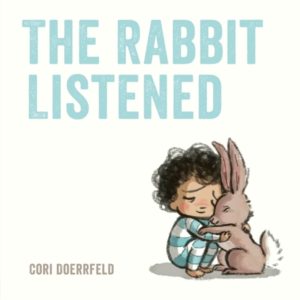
The Rabbit Listened is for 3–6 year olds who’ve experienced something upsetting and don’t know how to feel better. It helps them understand that sometimes you don’t need solutions or advice—you just need someone to sit with you and listen—through a story where different animals offer different types of comfort until Rabbit shows up and simply stays.”

That’s a “So What?” every role in the pipeline can work with. The editor knows it’s a social-​emotional title. The art director can visualize quiet, tender moments. The sales rep can pitch it to the feelings/​comfort shelf. And the parent shopping at their local indie bookstore immediately knows if their kid needs this book right now.

Your turn. Write the “So What?” for your current manuscript. If it lands clearly—no hemming and hawing, no vague language—you’ve got a solid foundation. But if you’re struggling to articulate it? That’s valuable information too. It usually means the manuscript itself needs clearer focus before it’s ready to send out.
Industry Insights: 11 Green Lights (and 5 Red Flags) in Editorial Assistant Applications

I recently hired an editorial assistant at my press, and the submissions were pouring in—hundreds of emails from eager applicants hoping to land a first job in publishing. After combing through the first few dozen, patterns start to leap off the screen. Some made me think yes, please. Others sank themselves before I even opened the attachment.

That made me realize this was a timely topic for an Industry Insights piece. So, here we go! Your mileage may vary with the following, but if you gave me a root beer and asked for my advice, this is more or less what I’d offer if you asked me.


If you’re applying for an entry-​level editorial role—or any publishing position that involves words, organization, and people—these are the signals that stand out for all the right reasons.


Green lights

  1. A subject line that says the job and your value
    “Editorial Assistant application – copyediting + kidlit marketing experience.”

  2. A three-​sentence opener that orients me
    Who you are, what you’ve done, what you can do for this role. Clear and human.

  3. Evidence you understand children’s books
    Name two or three recent picture books by title and publisher and one sentence on why they work.

  4. Proof you can handle details
    One paragraph describing how you track tasks, version files, and meet deadlines.

  5. Clean, calm formatting
    Consistent headers, white space, one font. No design experiments.

  6. A real line about why this press
    Show me you looked at our list. Mention a title and connect it to your skills.

  7. Transferable skills with receipts
    “Managed a 200-​entry submissions inbox with a 48-​hour acknowledgment target.”

  8. Comfort with the tools
    State proficiency levels for Google Workspace, Track Changes, Airtable, or Sheets, Zoom.
  9. Professional presence online
    If you include a website or LinkedIn link, make sure it’s current, typo-​free, and reflects the kind of work you want to do. I always check.

  10. Service mindset
    One sentence that shows you anticipate needs: scheduling, prep docs, recap notes.

  11. A respectful close with one ask
    “I’m glad to complete a short paid task if helpful. Thank you for the consideration.”


Red flags

For every polished, intentional application, there’s another that goes sideways in seconds. None of these mistakes are fatal—but each one quietly signals inexperience or carelessness.

  1. Generic cover letters that could go anywhere
    If I can swap in another press name and nothing breaks, I assume you didn’t prepare.
  2. Fuzzy timelines
    If your résumé lacks dates or uses vague ranges, I wonder what’s missing.
  3. Attachments named “Resume.pdf” or “document”
    Files without your name disappear fast in busy inboxes.
  4. Samples I cannot open
    Make sure permissions are appropriately set. Test them while logged out.
  5. Over-​promising
    Keep claims specific and verifiable. Confidence is welcome. Inflating is not.

One last thing

Every job in publishing starts with trust. Can you handle words carefully? Can you manage people’s work and time respectfully? Those answers begin forming the moment your email lands. The best applications feel like a preview of how you’d operate on the job—organized, thoughtful, and aware that someone’s time is on the other end of the screen.

Publishing is a relationship business, even at the inbox level. The way you apply becomes the first example of how you’ll edit, communicate, and collaborate once you’re in the door.

I tell my students this all the time. EVERYONE remembers the candidates who made their job easier. That’s the real first impression.

Industry Insights: Read and Write in Spreads

My Writing Picture Books class is building picture book dummies this week, so spread planning is on my desk and in my head. We had a great time folding paper and stapling up dummies in class last week, too.

If you’re new to making dummies, start with these two resources:

How to Craft a Picture Book Dummy

Picture Book Dummy, Picture Book Construction: Know Your Layout

As the students work with their dummies this week, I’ve asked them to assign a job to every spread. One spread, one purpose. Why? Weak spreads and soft page turns become hard to ignore. A dummy makes each spread’s job visible.

Use your dummy to shape spreads

Label the job for each spread, then place lines from your current draft that best serve that job. Keep only lines that serve a spread’s job. Move others to a better spread or copy them into a “cuts” file for possible reuse.

My spread job checklist

  • Promise: who or what the book is about and the energy it carries
  • Pattern: the everyday or plan we’ll soon disrupt
  • Tilt: the first small change
  • Escalate: effort increases or stakes rise
  • Breath: a quiet beat to reset attention
  • Surprise or Cost: the twist or the price of trying
  • Climax: the most charged action or reveal
  • Resonance: a final image that lingers

I tell my students to use this as a quick gut check while working on their dummies. When a moment is small, two jobs might even share one spread. If the book runs longer, the same spread logic applies. You can repeat Pattern, Tilt, Escalate, and Surprise or Cost until you reach the Climax and the final Resonance.

What editors and art directors notice

Here’s my advice for beginning and early career picture book writers. After two or three revision passes, make a quick paper dummy for yourself. Use that exercise to shape the manuscript you eventually submit because editors and art directors can tell when a story has been dummy tested. How do they know? Because it reads like a book.

  • Page turns feel intentional. The opening starts delivering the cover promise. A real breath appears where listeners need it. Reveals land on turns.

  • Lines leave room for pictures. You aim the feeling and the beat. The illustrator invents the staging.

  • Pacing fits the format. It reads cleanly in 32 pages because empty spreads were cut or combined.

  • The book is easy to picture in layout. Conversations move faster and decisions come easier.

That’s the point of making a dummy first, folks. It’s a simple craft step that signals professional readiness. Plus, it’s a good excuse to break out the glue sticks, scissors, staplers, and crayons and have some fun.